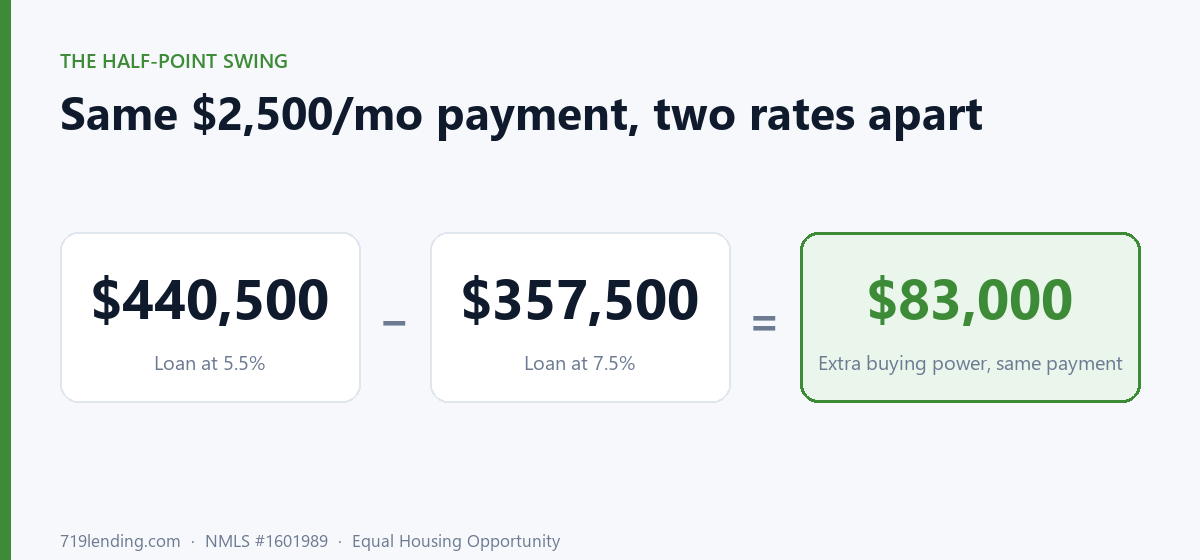
Your monthly payment is fixed in your head, but the house it buys moves every time rates do. The Buying Power calculator maps one payment across nine rates so you can see how much more loan a half-point drop hands you.
What Home Price Can I Afford? The Honest Math Most Calculators Skip
Last updated: June 30, 2026 — DTI cap defaults (back-end 45%, front-end 28%) and the 20%-down PMI threshold are general guidance; confirm current figures with a full pre-approval review.
What home price can you actually afford? It’s your gross monthly income times your debt-to-income cap, minus existing debts — then you strip out taxes, insurance, PMI, and HOA before converting what’s left into a loan. Most calculators skip that step and inflate the number. The honest answer accounts for escrow costs that grow with the very price you’re solving for.
That last part is the trap. Taxes, insurance, and PMI all scale with the home’s price — so the bigger the house, the bigger the escrow, which leaves less room for principal and interest, which lowers the price you qualify for. It’s a chicken-and-egg loop. 719’s What Can I Afford calculator solves it directly instead of pretending it doesn’t exist. Every figure it returns is an estimate, not a commitment to lend.

Why do most affordability calculators give you a number that’s too high?
Because they treat your whole housing budget as if it all goes to the mortgage. It doesn’t. A real monthly payment is PITI plus extras — Principal, Interest, Taxes, Insurance, plus PMI and HOA when they apply. If a calculator hands your entire budget to principal and interest, the loan (and the price) it shows you is bigger than a lender will actually support.
The 719 tool works backward the way an underwriter does. It starts from your gross monthly income and your back-end DTI cap (default 45%), subtracts your existing monthly debts, and that gives you the maximum housing budget. From there it carves out the escrow line items first, leaving only the true principal-and-interest budget. That P&I budget — at your chosen rate and term — is what gets converted into a loan amount. Add your down payment, and you’ve got an honest estimated home price.
How does the calculator solve the escrow chicken-and-egg problem?
With a self-consistent auto-escrow solver. In “Estimate for me” mode, the calculator can’t know your taxes and insurance until it knows the price — but it can’t know the price until it knows the escrow. So it loops: it estimates a price, calculates the escrow that price would create, recomputes the price with that escrow baked in, and repeats until the price stops moving. The result is a price where the payment genuinely reflects the escrow that price produces.
No hand-waving, no flat “estimate” that falls apart the moment a real tax bill shows up. Prefer exact numbers from a quote? Flip to manual escrow mode and enter your own figures for taxes, insurance, and HOA.

How does PMI change my affordable price?
PMI only applies when your down payment is under 20% — and the calculator accounts for it as part of your monthly payment. Because PMI eats into the budget that would otherwise go toward principal and interest, carrying it lowers the price you can support. The larger your down payment, the smaller that drag.
Cross 20% down and PMI disappears entirely — which is why the brief calls it the 20%-down cliff. Removing PMI frees up budget twice over: you’re no longer paying the premium, and the dollars that were covering it now go toward principal and interest, buying more house. Here’s the kind of contrast the tool surfaces (illustrative example):
| Down payment | PMI applies? | Effect on budget |
|---|---|---|
| Under 20% | Yes | PMI consumes part of your monthly payment, lowering the price you support |
| At or above 20% | No | Budget freed twice: no premium + those dollars buy more home |
Want to see exactly where your cliff sits? Run your numbers in the What Can I Afford calculator and nudge the down payment up to 20%.
What’s the difference between the back-end cap and the front-end cap?
Two different ceilings, and the calculator respects both. The back-end DTI cap (default 45%) limits your total debt — housing plus car loans, credit cards, everything — as a share of income. The optional front-end cap (default 28%) limits housing alone. You can layer the housing-only cap on top of the total-DTI cap, and the tool tells you which one is actually binding your price.
That matters. If your other debts are low, the back-end cap (default) sets your ceiling. If they’re high, or if you turn on a tight front-end cap, you might be “limited by your housing cap” instead. Knowing which lever is holding you back tells you what to fix — pay down a card, or accept a smaller housing share.
What does the calculator actually give me?
A concrete, defensible set of estimated outputs rather than a single vague number:
| Inputs you provide | Outputs you get back |
|---|---|
| Gross monthly income | Max home price |
| Back-end DTI cap (default 45%) | Loan amount |
| Optional front-end cap (default 28%) | All-in monthly payment (PITI + PMI + HOA) |
| Other monthly debt | P&I, taxes, insurance, PMI, HOA — itemized |
| Interest rate (eighth-point steps) | First-month principal/interest split |
| Term (5/10/15/20/25/30 yr) | Actual front and back DTI vs. your caps |
| Down payment | Which cap is binding |
| Escrow mode (auto/manual) & HOA | Branded PDF (NMLS #1601989) |
Each result is an estimate based on the figures you enter — handy for planning and for handing to a real estate agent, but not a substitute for a full pre-approval review.
What happens when the numbers don’t work?
The calculator has honest guard rails — it refuses to fake a result it can’t support. If your existing debts already exceed your DTI cap, it hard-stops rather than showing a negative budget. And if escrow costs would eat your entire housing budget, it tells you instead of pretending a price exists. These aren’t error messages for their own sake — they’re the calculator declining to mislead you, which is the whole point.
Because it’s a single-scenario tool, the most useful trick is to run it twice — once at your current down payment and once at 20% down, or once at today’s rate and once an eighth-point lower — and compare the two max prices. That side-by-side shows you how aggressive your budget really is and which moves actually change it.
Ready to estimate your real ceiling? Try the What Can I Afford calculator, or browse every tool on the 719 Lending Calculate hub to plan the rest of your purchase. All results are estimates.
719 Lending Inc., NMLS #1601989 · Equal Housing Opportunity · This article is educational only, is not a commitment to lend, and not all applicants will qualify.
Frequently asked questions
Does the What Can I Afford calculator include taxes, insurance, and PMI? Yes — that's the whole point. It strips taxes, insurance, PMI, and HOA out of your housing budget before converting what's left into a loan amount, so the estimated max price reflects your true all-in PITI payment rather than principal and interest alone. Many calculators skip this and inflate the number.
How does the auto-escrow solver work? In 'Estimate for me' mode, taxes, insurance, and PMI all scale with the price being solved for, creating a chicken-and-egg loop. The calculator loops through the math, recomputing price and escrow together until the price stops moving, so the payment reflects the escrow that price actually produces. You can also switch to manual escrow mode to enter exact figures from a quote. Results are estimates.
When does PMI get added, and what happens at 20% down? PMI applies only when your down payment is under 20%, and it consumes part of your monthly payment, lowering the price you can support. Crossing 20% down removes PMI entirely, which frees up budget twice — no premium, and those dollars now buy more home.
What's the difference between the back-end and front-end DTI caps? The back-end cap (default 45%) limits all your debt as a share of income; the optional front-end cap (default 28%) limits housing costs alone. You can layer both, and the calculator tells you which cap is binding your estimated max price so you know what to adjust.
Can I compare two scenarios? The tool is single-scenario, but you can run it twice and compare — for example at your current down payment versus 20% down, or at two different rates — to see how aggressive your budget is and which inputs actually move your affordable price.

Related Posts